MIRR Calculator
Paste your cash flows and the two rates to get the MIRR, with the IRR for comparison.
Free · runs in your browser · nothing is uploaded
Recent
Your last 10 settings, saved only in this browser. Nothing is uploaded.
A MIRR calculator, short for modified internal rate of return, fixes two weaknesses of the ordinary IRR. The IRR assumes every inflow is reinvested at the IRR itself, which flatters a good project, and a cash-flow list that changes sign more than once can have several IRRs or none. MIRR instead discounts the outflows at a finance rate and compounds the inflows at a reinvestment rate, giving one answer.
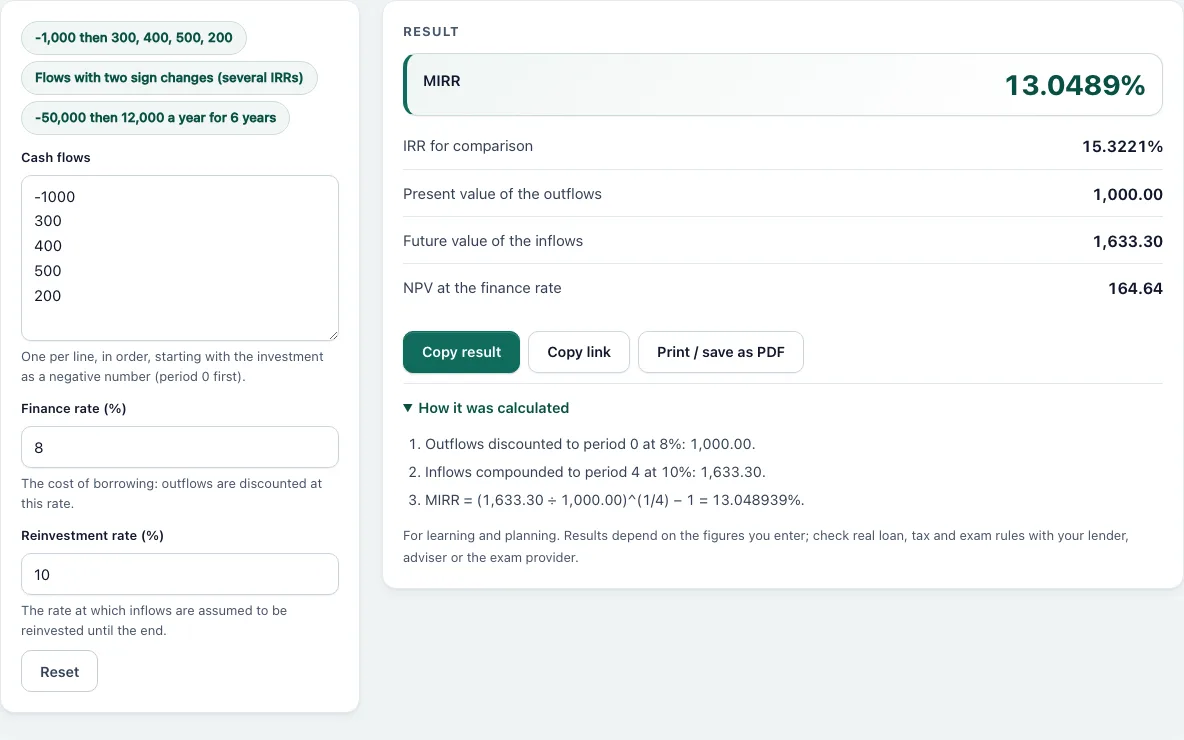
Enter the cash flows, one per line, starting with the investment as a negative number, and the two rates. The calculator returns the MIRR, the IRR for comparison, the present value of the outflows, the future value of the inflows and the NPV, and warns when the flows have more than one IRR.
How to use the MIRR Calculator
- Type the Cash flows in the box, one number per line, in time order. The first is period 0, usually the investment as a negative number, for example -1000.
- Enter the Finance rate: the cost of borrowing or capital, used to discount outflows to period 0.
- Enter the Reinvestment rate: the return you expect on cash you receive until the end.
- Read the MIRR. The row IRR for comparison shows the ordinary IRR when one exists.
- Check the Present value of the outflows, the Future value of the inflows and the NPV at the finance rate.
- If the flows change sign more than once, read the warning under the results: it lists the IRRs found.
- Open How it was calculated for the MIRR formula with your numbers.
The example buttons load a five-period project, a flow with two IRRs and a six-year income stream.
Use realistic rates: the finance rate is what borrowing really costs you, and the reinvestment rate is what you could earn on the cash you receive. Try both at the same rate, and then 2 points apart, to see how sensitive the MIRR is.
Flows are treated as equally spaced, one period apart. For flows on specific dates, use the XIRR calculator, and for a single rate on regular flows without a reinvestment assumption, use the IRR calculator on this site’s sister tools.
MIRR formula
With N periods after period 0:
MIRR = (FV of inflows ÷ −PV of outflows)^(1/N) − 1
The outflows are discounted to period 0 at the finance rate, and the inflows are compounded to period N at the reinvestment rate. The period counts from the first cash flow, so five flows mean N = 4.
Worked examples
| Cash flows | Finance / reinvestment | MIRR | IRR |
|---|---|---|---|
| −1,000, 300, 400, 500, 200 | 8% / 10% | 13.0489% | 15.3221% |
| −50,000, then 12,000 × 6 | 6% / 6% | 8.9672% | 11.5305% |
| −100, 230, −132 | 10% / 10% | 10% | 10% (20% also fits) |
The MIRR is below the IRR in the first two rows because it assumes reinvestment at 10% and 6%, not at 15.3% or 11.5%. The third row has two IRRs, 10% and 20%; the MIRR gives one clear figure.
When to prefer MIRR
Use MIRR when you can state a realistic finance rate and reinvestment rate, when cash flows change sign more than once, and when you compare projects of different sizes or lengths. The result is still a rate, so also look at NPV for the size of the gain.
Why MIRR is often more realistic than IRR
The IRR of a good project can be 25% or more, but that figure assumes each cash inflow is reinvested at 25%, which is rarely possible. MIRR replaces that assumption with the reinvestment rate you actually expect, so the answer is a return you could plausibly achieve.
- One answer. IRR can have several values when flows change sign more than once, as the example with −100, 230, −132 shows (10% and 20%). MIRR gives one.
- Project ranking. MIRR ranks projects of different lengths more fairly than IRR, though NPV remains the better measure of the value added.
- Negative cash flows after the start. If a project needs more money later, MIRR discounts those outflows to period 0 at the finance rate.
MIRR versus NPV
NPV in money and MIRR as a rate answer different questions: how much value, and how efficiently. A big project with a modest MIRR can add more value than a small one with a high MIRR. Check both: the NPV at the finance rate is shown below the MIRR.
Reading the warning
If the calculator lists several IRRs, the ordinary IRR is ambiguous and should not be used. The MIRR remains valid. If the flows change sign twice but have only one IRR, the calculator tells you to check it against the MIRR.
Frequently asked questions
What is the difference between IRR and MIRR?
IRR assumes interim cash is reinvested at the IRR itself. MIRR uses the reinvestment rate you give it, which is usually more realistic.
Can the MIRR be higher than the IRR?
Yes, if your reinvestment rate is higher than the IRR. For a project with a high IRR, the MIRR is usually lower.
Why are there two rates to enter?
The finance rate prices the money you put in; the reinvestment rate prices what you do with the money you get back. They can be the same.
How is this different from the spreadsheet MIRR function?
The same definition. Note that this calculator treats the first value as period 0 and does not discount it, as financial calculators do; spreadsheet NPV functions discount the first value by one period.
What if my flows are on irregular dates?
Use the XIRR calculator, which takes dates.
How many cash flows can I enter?
Up to 200, one per line. Periods are assumed to be equal, so each line is one period after the previous one.
Can I use negative flows later in the list?
Yes. Later outflows are discounted to period 0 at the finance rate, and inflows are compounded at the reinvestment rate.
- XIRR Calculator: annual return of cash flows on specific dates
- CAGR Calculator: the steady growth rate between two values
- Rule of 72 Calculator: years to double, by the rule and exactly
- Bond Price Calculator: clean and dirty price from the yield
- Yield to Maturity Calculator: the yield implied by a bond price
- Lease Payment Calculator: monthly lease payment and its two parts
- Balloon Payment Calculator: the lump sum due at the end of a loan
- The TVMStack app: the planned app that adds cash flows, NPV and IRR
- About the tools: how the results are computed and tested