Loan Amortization Calculator
Enter the loan amount, rate and term to get the payment and the full repayment schedule.
Free · runs in your browser · nothing is uploaded
Recent
Your last 10 settings, saved only in this browser. Nothing is uploaded.
An amortization schedule lists every loan payment and splits it into interest and principal, with the balance left after each one. This loan amortization calculator builds yours from the loan amount, rate and term.
A loan amortization calculator shows how a loan is repaid: the fixed payment, and how each payment splits between interest and principal as the balance falls. Early payments are mostly interest; later ones are mostly principal.
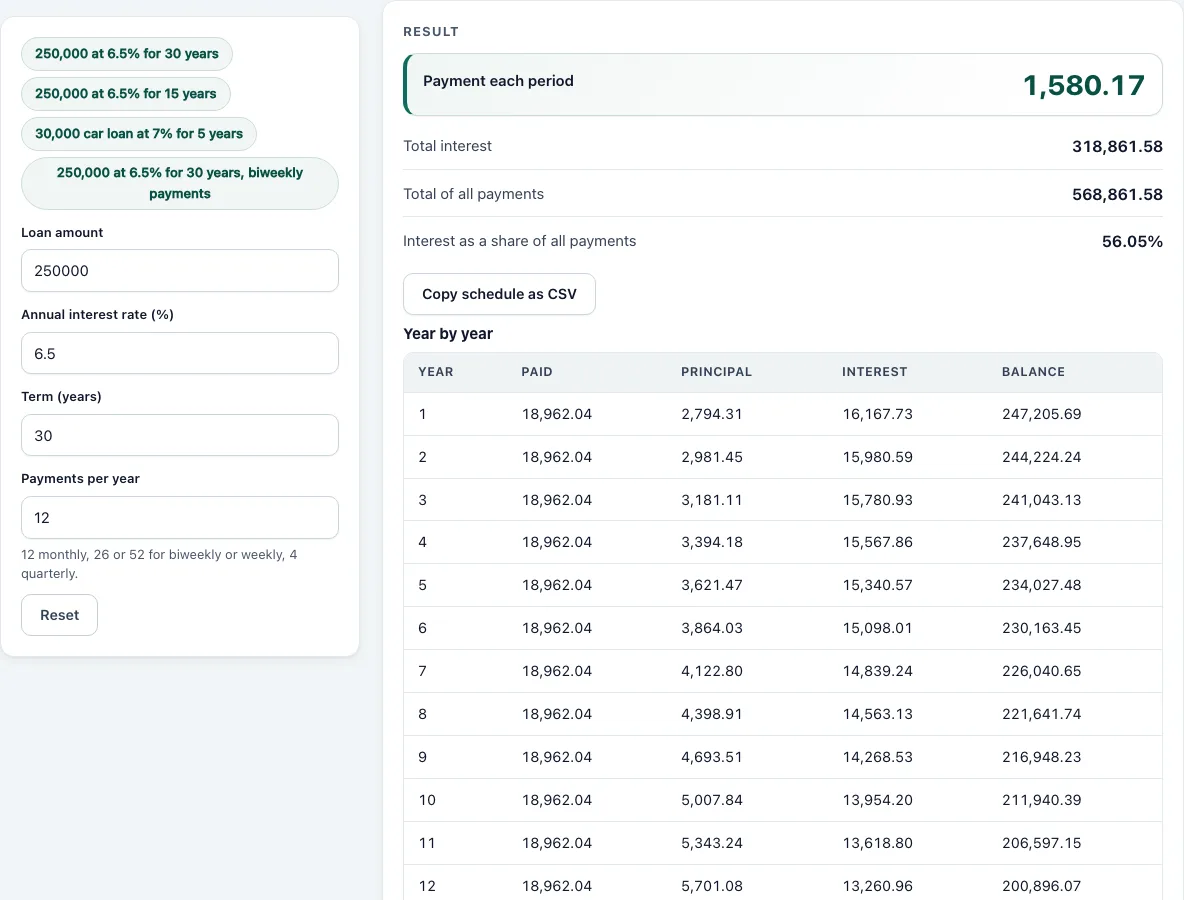
Enter the loan amount, the annual rate, the term and how often you pay. The calculator returns the payment, the total interest and the total repaid, with a year-by-year table, the first twelve payments in detail and the whole amortization schedule, which you can copy as CSV for a spreadsheet. Payments and interest are rounded to cents, and the last payment clears the balance exactly.
How to use the Loan Amortization Calculator
- Enter the Loan amount you borrow.
- Enter the Annual interest rate as a percentage, for example 6.5.
- Enter the Term (years), for example 30 for a mortgage or 5 for a car loan.
- Set Payments per year: 12 for monthly. Use 26 for biweekly or 52 for weekly payments.
- Read the Payment each period, the Total interest and the Total of all payments. The interest share shows how much of what you repay is interest.
- Open How it was calculated to see the payment formula with your numbers and the split of the first payment.
- Scroll to the tables: the yearly summary shows what was paid, how much went to principal and interest and the balance at each year end; the second table lists the first payments.
- Press Copy schedule as CSV above the tables to paste every payment into a spreadsheet.
The example buttons load a 30-year and a 15-year mortgage, a car loan and biweekly payments.
To see the effect of a shorter term or a lower rate, change that one field and compare the Total interest row and the yearly table with the earlier run.
For a loan with a different payment schedule, such as interest only at first, use the balloon payment calculator, which models a payment that does not repay the whole loan.
Amortization formula
With a loan P, a rate i per period and N payments, the level payment is:
Payment = P·i ÷ (1 − (1+i)^−N)
Each period the interest is the balance times i. The rest of the payment reduces the balance, so the next interest charge is a little smaller. That is why the principal share of each payment grows over the loan.
Worked examples
| Loan | Rate | Term | Payment | Total interest |
|---|---|---|---|---|
| 250,000 | 6.5% | 30 years, monthly | 1,580.17 | 318,861.58 |
| 250,000 | 6.5% | 15 years, monthly | 2,177.77 | 141,998.15 |
| 30,000 | 7% | 5 years, monthly | 594.04 | 5,642.12 |
| 250,000 | 6.5% | 30 years, 26 payments a year | 728.97 | 318,586.14 |
Halving the term from 30 to 15 years raises the payment by about 38% but cuts the interest from 318,861.58 to 141,998.15. In the first payment of the 30-year loan, interest takes 1,354.17 of the 1,580.17.
What is an amortization schedule?
An amortization schedule is a table of every payment on a loan. Each row shows the payment, the part that pays interest, the part that reduces the principal and the balance that remains. The balance reaches zero with the last payment.
Amortization schedule and extra payments
The schedule lists every payment with its interest, principal and remaining balance. The two methods used in Japan and Brazil differ: with level payments (元利均等, Tabela Price) the payment is constant; with constant principal (元金均等, SAC) the principal repaid is constant and the payment falls. For the Japanese comparison see the Japan FP six coefficients calculator.
Reading the schedule
The year-by-year table is the quickest view of a loan. In the 30-year, 6.5% example, the first year’s payments are almost all interest and the balance barely moves; by year 20 most of each payment is principal. The point where half the payment is principal comes late, about year 21 for this loan.
- Total interest is the real cost of borrowing. For the 30-year loan it exceeds the amount borrowed.
- Balance at year end is what you would owe if you sold or refinanced at that date.
- Interest share shows how much of everything you repay is interest: 56.05% for the 30-year loan, 36.22% for the 15-year one.
Extra payments and refinancing
Paying more than required early in the loan saves the most, because it reduces the balance that interest is charged on for every remaining period. To model an extra payment, run the calculator with a shorter term and a higher payment, or use the TVM calculator to find how many periods a larger payment needs.
Rounding
Each payment and interest figure is rounded to cents, as lenders do, and the last payment is adjusted so the balance ends at exactly zero. Your lender’s figures may differ by a few cents because of its own rounding rules or because the first period is not a full month.
Frequently asked questions
What is amortization?
Paying off a loan in regular instalments so that the balance reaches zero at the end of the term, with each payment covering the interest due and part of the principal.
Why are the first payments mostly interest?
Interest is charged on the outstanding balance, which is at its highest at the start.
Do biweekly payments save interest?
With 26 payments a year of half the monthly amount, you make the equivalent of 13 monthly payments a year and repay faster. This calculator treats 26 payments as equal-sized periods, so it shows the schedule for that payment frequency, not the extra payment effect.
Does the schedule include taxes, insurance or fees?
No. It covers principal and interest only. Add escrow items such as taxes and insurance separately.
How do I find the balance after a number of payments?
Look at the table of first payments for the first year, or copy the schedule as CSV and look up the row. The balance after payment n is the remaining principal.
Does this work for a mortgage with a rate that changes?
No. It assumes one fixed rate for the whole term. For an adjustable loan, run it again from the reset date with the remaining balance and term.
- APR Calculator: the true yearly cost of a loan with fees
- Lease Payment Calculator: monthly lease payment and its two parts
- Balloon Payment Calculator: the lump sum due at the end of a loan
- Japan FP Six Coefficients Calculator: the six coefficients of the Japanese FP exams
- TVM Calculator: solve any one of N, I/Y, PV, PMT or FV
- Future Value Calculator: what a sum and regular deposits grow to
- The TVMStack app: the planned app that adds cash flows, NPV and IRR
- About the tools: how the results are computed and tested