CAGR Calculator
Enter any three of start, end, years and growth rate to find the fourth.
Free · runs in your browser · nothing is uploaded
Recent
Your last 10 settings, saved only in this browser. Nothing is uploaded.
A CAGR calculator finds the compound annual growth rate: the steady yearly rate that takes a value from where it started to where it ended. It smooths out the ups and downs in between, which makes it the standard way to compare the growth of investments, revenues or users over several years.
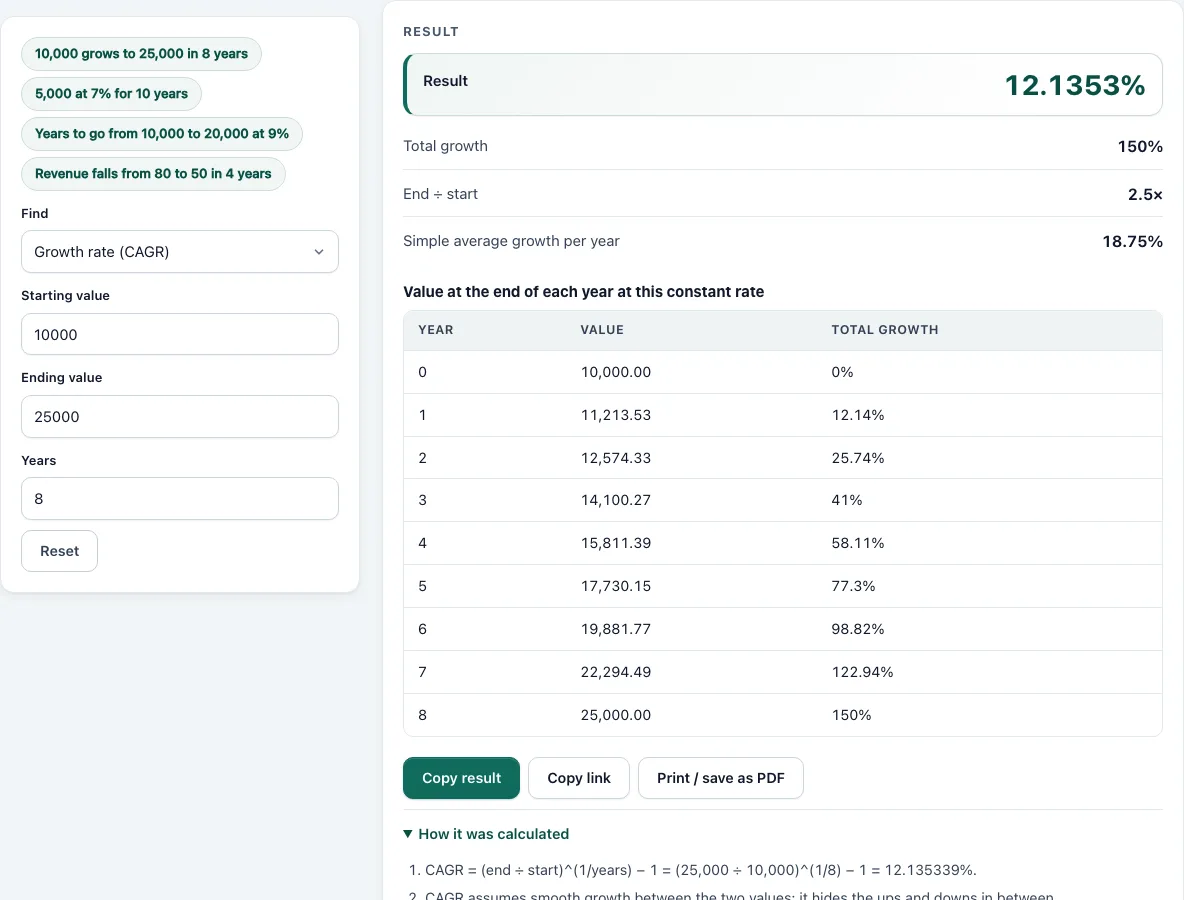
This CAGR calculator finds the growth rate from a start value, an end value and a number of years. It can also work the other way: the ending value from a rate, the number of years to reach a target, or the starting value that grows to a given end. Each result shows the formula with your numbers, the total growth and, for whole years, a table of the value at the end of each year.
How to use the CAGR Calculator
- In Find, choose the Growth rate (CAGR), the Ending value, the Number of years or the Starting value.
- Fill in the three fields that remain: starting value, ending value, years or growth rate per year (in percent).
- Read the main result at the top. The rows below show the total growth, the end-to-start multiple and the simple average growth per year, which is always different from the CAGR.
- For a falling value, the CAGR comes out negative and a note says so.
- Open How it was calculated to see the formula with your numbers.
- For a whole number of years, the table shows the value at the end of each year at this constant rate.
The example buttons load 10,000 growing to 25,000 in eight years, 5,000 growing at 7%, the years to double at 9% and a falling revenue figure.
For a fall in value, enter the lower ending value and the calculator shows a negative CAGR. To see what growth you need to reach a target, choose the growth rate mode, or use years mode to see how long a given rate takes.
Entries may carry commas or a percent sign, so 25,000 and 12% are read correctly. The growth rate field is a yearly percentage, and the years field accepts decimals such as 2.5.
CAGR formula
CAGR = (End ÷ Start)^(1 ÷ Years) − 1
Rearranged: End = Start × (1 + CAGR)^Years, Years = ln(End ÷ Start) ÷ ln(1 + CAGR), and Start = End ÷ (1 + CAGR)^Years.
Worked examples
| Start | End | Years | CAGR |
|---|---|---|---|
| 10,000 | 25,000 | 8 | 12.1353% |
| 80 | 50 | 4 | −11.086% |
| Find | Inputs | Result |
|---|---|---|
| Ending value | 5,000 at 7% for 10 years | 9,835.76 |
| Years | 10,000 to 20,000 at 9% | 8.0432 years |
For 10,000 growing to 25,000 the total growth is 150%, the simple average is 18.75% a year, but the CAGR is 12.1353%: the compound rate is lower because each year’s growth applies to a larger base.
Limits of CAGR
CAGR describes the path as a smooth line, so two investments with the same CAGR can have very different volatility. It also depends on the endpoints: change the start or end date and the CAGR changes. Use it to compare growth over the same period, not to predict the future.
Using CAGR well
CAGR is a descriptive number: it says what steady rate would have produced the same result. It is the standard measure for comparing revenue growth, fund performance over several years, or the growth of a user base.
- Compare the same period. CAGRs over different spans are not comparable. A five-year CAGR that starts in a boom looks different from one that starts in a slump.
- Check the endpoints. Because only two numbers count, a single unusual start or end value can change the result a lot.
- Do not average it. Never average CAGRs of different periods; compute a new one from the combined start and end values.
- Do not forecast with it blindly. Past growth rarely continues at the same rate, especially for fast-growing businesses.
CAGR and other growth measures
Year-over-year growth shows each year separately. The arithmetic average of those yearly rates overstates the compound result when they vary: growth of +50% then −50% averages to 0% but leaves you 25% down. CAGR avoids that error because it works from the actual start and end values.
Using CAGR to set targets
The inverse modes help planning. To triple a revenue figure in six years you need a CAGR of about 20%, and to hold a 7% CAGR for ten years doubles a value almost exactly. Enter the numbers in the right mode to see the result with the working.
Frequently asked questions
How do I calculate CAGR in a spreadsheet?
Use =(End/Start)^(1/Years)-1. This calculator does the same and shows the steps.
Is CAGR the same as average annual return?
No. The simple average adds the yearly returns and divides by the count; CAGR is the single rate that compounds to the same end result. CAGR is usually lower when returns vary.
Can CAGR be negative?
Yes, when the ending value is below the starting value. The calculator shows a negative rate and a note.
Does the number of years have to be whole?
No. Enter 2.5 for two and a half years. The yearly table appears only for whole years.
What is the difference between CAGR and IRR?
CAGR needs a start value and an end value only. IRR also handles cash flows in between, such as deposits and withdrawals.
Can I use months instead of years?
Yes: enter the years as a decimal, for example 0.5 for six months. The CAGR is still an annual rate.
Is CAGR the same as ROI?
ROI is the total gain over the whole period. CAGR is that gain expressed as a steady rate per year, so it lets you compare projects of different lengths.
- MIRR Calculator: return that avoids the multiple-IRR problem
- XIRR Calculator: annual return of cash flows on specific dates
- Rule of 72 Calculator: years to double, by the rule and exactly
- Bond Price Calculator: clean and dirty price from the yield
- Yield to Maturity Calculator: the yield implied by a bond price
- Perpetuity Calculator: value of payments that never end
- Sinking Fund Calculator: the deposit that reaches a target
- The TVMStack app: the planned app that adds cash flows, NPV and IRR
- About the tools: how the results are computed and tested